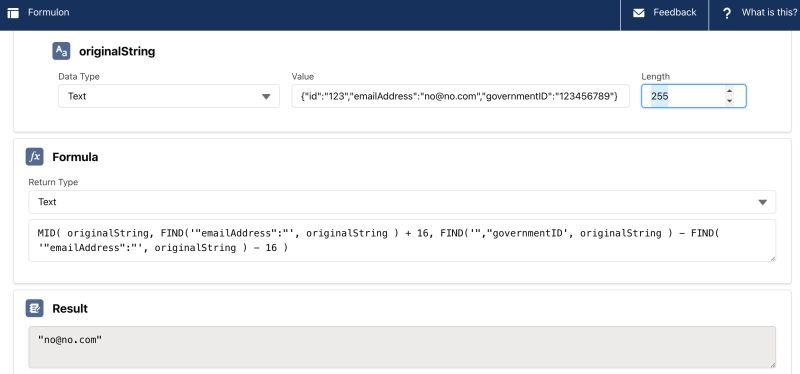
🧪💧 How would you extract a substring from another string in a formula/flow?
For example, let's say you have a JSON (you probably shouldn't have one but this is a contrived example) that you need to extract a certain field in the middle of it.
You want to extract the email address from below:
👉🏼 originalString: {"id":"123","emailAddress":"no@no.com","governmentID":"123456789"}
Simple example and suggested formula:
👉🏼 MID( originalString, FIND( beginningDelimiter, originalString ) + sizeOfBeginningDelimiter, FIND( endingDelimiter, originalString ) - FIND( beginningDelimiter, originalString ) - sizeOfBeginningDelimiter )
👉🏼 beginingDelimiter: "emailAddress":"
👉🏼 endingDelimiter: ","governmentID
👉🏼 sizeOfBeginningDelimiter: 16 (from "emailAddress":")
See example in the screenshot (using formulon.io to more quickly test formulas)
PS.: It is better to not rely on the JSON being always in the same format (someone may add another fields or change the order of fields) and use Apex instead of formula.
However, I've seen clients being adamant about not using any Apex whatsoever (and this policy was from their IT - incredibly!).