💡 Extracting Text Between Delimiters in Salesforce Flows
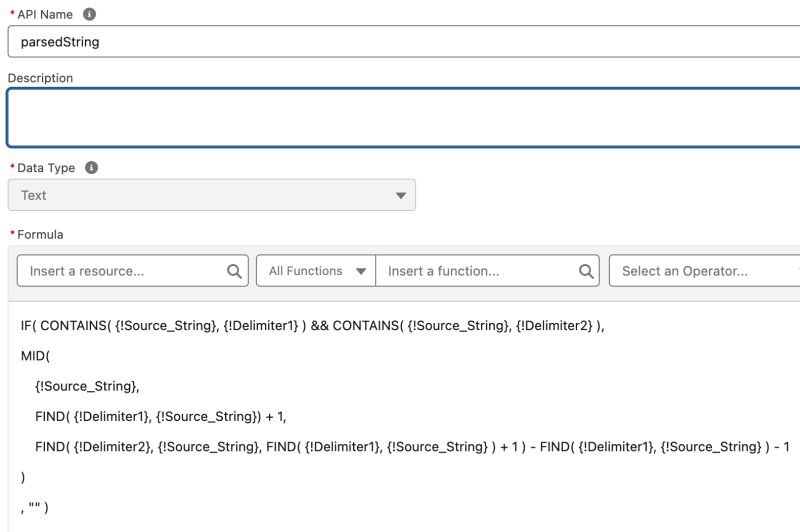
In my previous post, I used a flow formula to extract the hour from a date/time string by parsing data between delimiters. This technique is somewhat versatile, so here is a generic formula you can use to parse data from a string:
👉 parsedString = IF( CONTAINS( {!Source_String}, {!Delimiter1} ) && CONTAINS( {!Source_String}, {!Delimiter2} ),
MID( {!Source_String},
FIND( {!Delimiter1}, {!Source_String} ) + 1,
FIND( {!Delimiter2}, {!Source_String}, FIND( {!Delimiter1}, {!Source_String} ) + 1 ) - FIND( {!Delimiter1}, {!Source_String} ) - 1
)
, "" )
1️⃣ Same Delimiters:
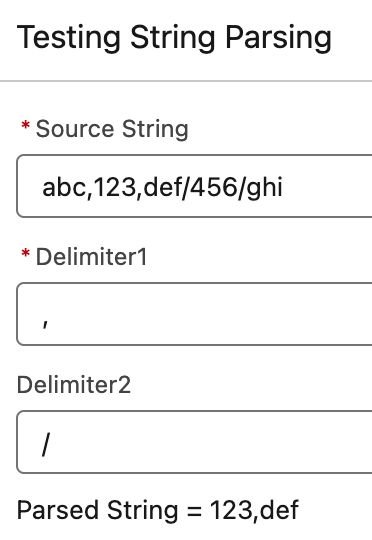
If both delimiters are the same, simply replace {!Delimiter2} with {!Delimiter1}, and the formula will work.
2️⃣ Variable-Length Delimiters:
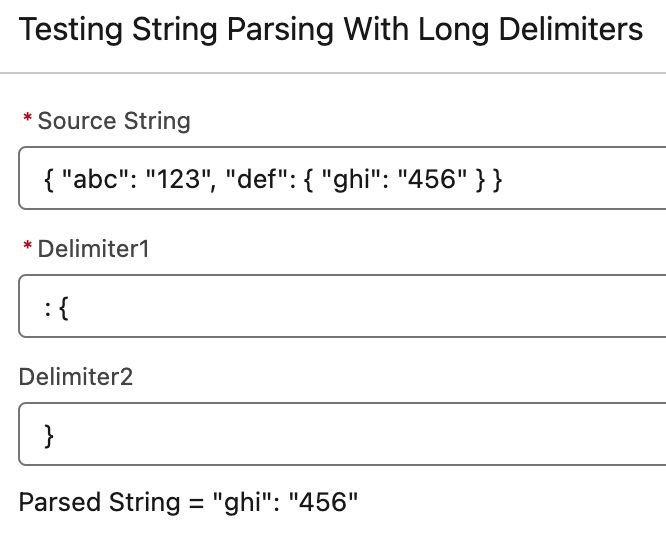
If the delimiters are longer than one character (e.g., << or {{), update the formula by replacing the 1s with the delimiter length: LEN( {!Delimiter1} )
3️⃣ Error Handling:
This formula checks if both delimiters are present in the source string using CONTAINS. If either delimiter is missing, the result is an empty string "" to avoid potential errors, though you still have to plan for scenarios like missing values, unexpected characters, or incomplete input.
Some practical applications for this method of parsing are:
• extract domains from email addresses
• extract date components from text
• extract first and last names
• extract phone numbers for validation
• parsing JSON response from an API
Hopefully, this formula can simplify some automation flows in Salesforce.
Have you used similar techniques? 💬 👇
🤯 Now a curve ball: what if you have to extract the nth element between delimiters? For example, you want the 3rd column on a CSV text. There is a way to do it but you have to do some nesting with part of the generic formula.
And "the more nested, the more nasty." Better do it via Apex! 😉